Editing Vendors
Open any vendor from the vendor list to view and update their details. The vendor record is organized into tabs.
Walkthrough
Step 1 of 3Find the vendor
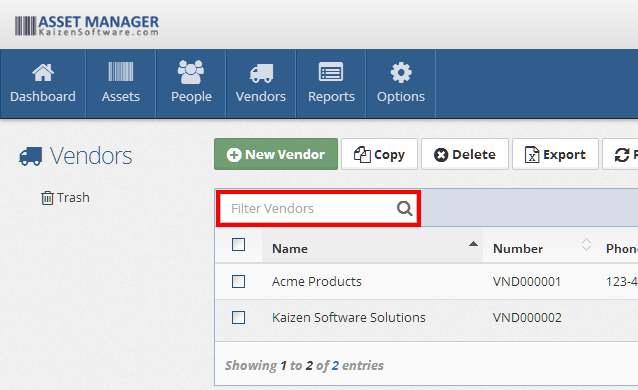
Use the search or filters on the vendor list to find the vendor you want to edit.
General Tab
The General tab contains the vendor's contact and address information:
| Field | Description |
|---|---|
| Vendor Name | The company or vendor name (required) |
| Vendor Number | A unique identifier. Leave blank to auto-generate |
| Phone Number | Main phone number |
| Website | Vendor's website URL |
| Contact Name | Primary contact person at the vendor |
| Email Address | Contact email address |
| Address 1 | Street address line 1 |
| Address 2 | Street address line 2 |
| City | City |
| State/Province | State or province |
| Postal Code | ZIP or postal code |
| Country | Country |
Assets Tab
This tab shows all assets linked to this vendor through the Purchasing tab on asset records. The table displays: Asset Name, Asset Number, Brand, and Model.
Notes, Files, and History Tabs
| Tab | Description |
|---|---|
| Notes | Rich text editor for free-form notes about the vendor |
| Files | Attach documents to the vendor record |
| History | Read-only log of every action taken on this record — action type, change summary, user, and timestamp |